
- Published on
- •2 min read
How HTTPS Really Works: TLS Handshakes, Certificates and Encryption Explained
- Authors

- Name
- Pulathisi Kariyawasam
Introduction
I started digging into this while setting up a TLS-secured database connection. What I thought was a simple checkbox turned into a rabbit hole TCP, certificates, certificate authorities, Diffie-Hellman, forward secrecy. Took me a while to piece together how it all connects.
So here's me trying to document that whole picture in one place, building from the ground up. By the end you'll see exactly how a client and server build trust, derive an encryption key without ever sending it over the wire, and keep all traffic unreadable even to someone capturing every packet.
Part 1: Network Foundations
Before TLS makes any sense, you need to know where it actually sits in the network stack.
The OSI Model Where TLS Lives
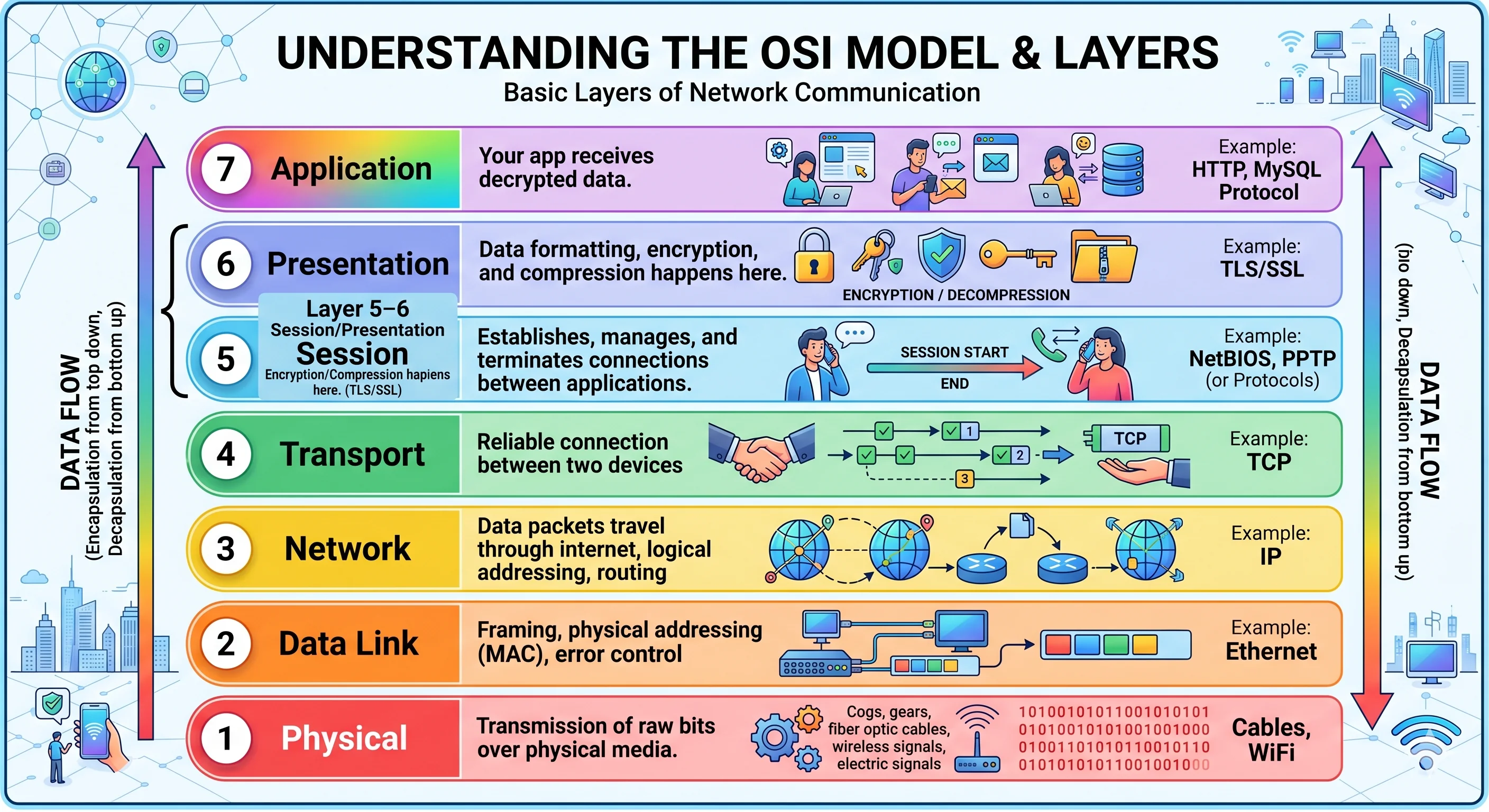
| Layer | Name | What Happens | Example Protocol |
|---|---|---|---|
| Layer 1-3 | Physical/Network | Data packets travel through internet | IP, TCP |
| Layer 4 | Transport | Reliable connection between two devices | TCP |
| Layer 5-6 | Session/Presentation | Encryption/Compression happens here | TLS/SSL |
| Layer 7 | Application | Your app receives decrypted data | HTTP, MySQL Protocol |
TLS sits at layers 5-6. It wraps around whatever your app does at layer 7 and handles encryption before anything hits the wire.
TCP The Foundation Under TLS
TLS doesn't replace TCP. It runs on top of it. So before any TLS negotiation can happen, a TCP connection has to be established first. TCP uses a Three-Way Handshake:
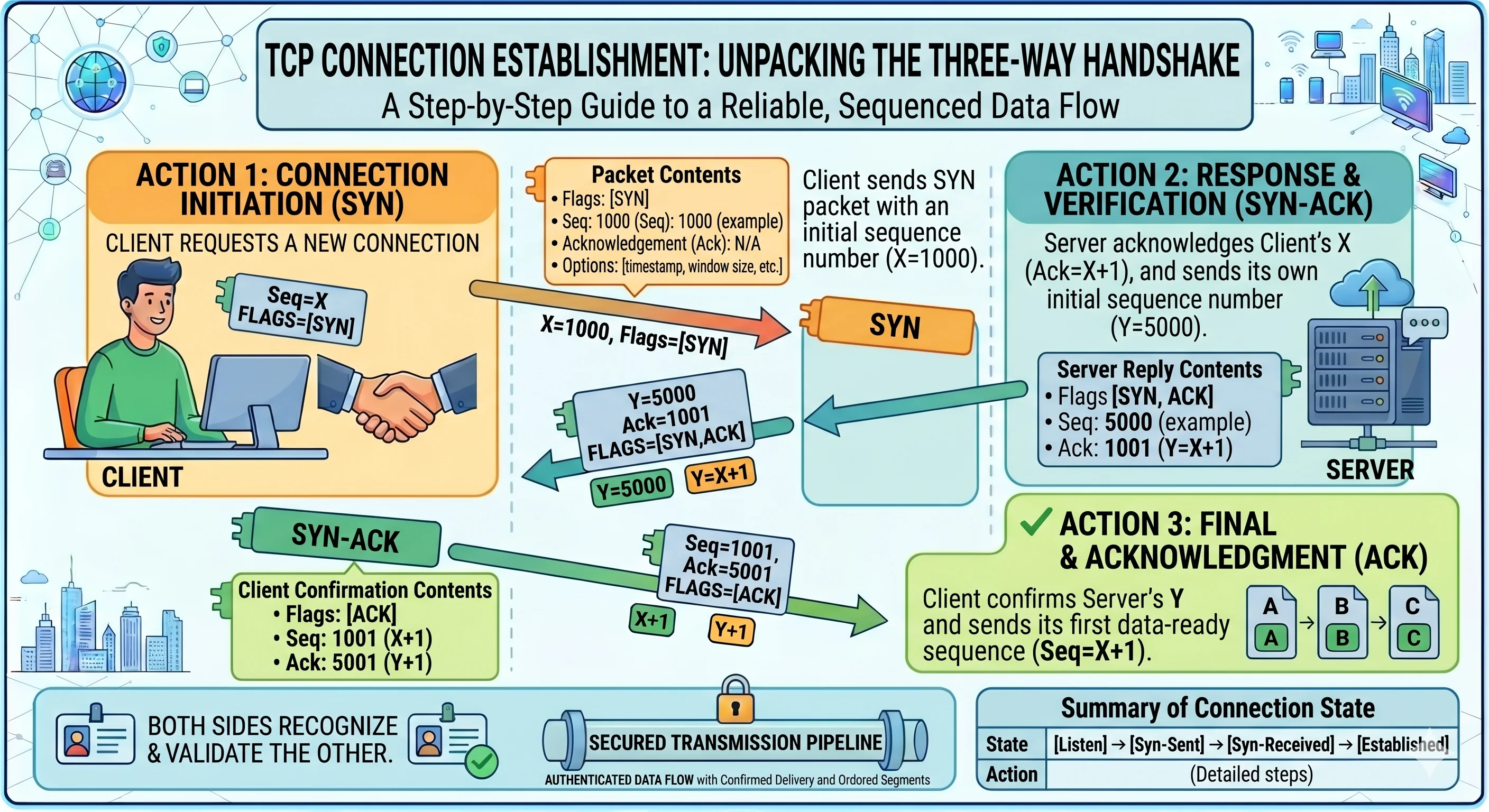
1. Client sends: SYN
"Hello, I want to connect" with a sequence number (X) so the server can track ordering.
Seq=X, Flags=[SYN]
2. Server replies: SYN-ACK
"Got it, I'm here" server confirms and sends its own sequence number (Y).
Seq=Y, Ack=X+1, Flags=[SYN,ACK]
3. Client sends: ACK
"Confirmed" both sides now know the other is reachable.
Seq=X+1, Ack=Y+1, Flags=[ACK]
✓ TCP connection established. Reliable, ordered data transfer is now possible.
Dive Deeper: Run a packet capture with Wireshark you'll see these exact sequence numbers in real handshakes. Good way to make the theory concrete.
The critical point here: TCP is completely unencrypted. Every byte sent over a raw TCP connection is readable by anyone on the network between you and the server. That's exactly the problem TLS is there to solve.
Part 2: What Can Go Wrong Without Encryption
With only a TCP connection, the data flowing between client and server is naked on the wire. Three attacks become trivial:
- Eavesdropping attacker on the same network reads your passwords, tokens, API keys in plaintext
- Man-in-the-Middle (MITM) attacker sits between you and the server, silently reading and modifying messages in both directions
- Impersonation a fake server convinces you it's the real one and you send it everything
👨 Client  →  🖥️ Server
⚠️ Anyone on the path can see and modify this data
The Solution: TLS
TLS (Transport Layer Security) and its older deprecated version SSL creates an encrypted tunnel on top of the TCP connection. Once that tunnel is up, even if someone captures every packet, they see noise.
Analogy: Instead of shouting across a crowded room (plain TCP), you and the server step into a soundproof booth. Anyone outside can see you're having a conversation but can't hear a word.
Part 3: Cryptography Basics
TLS uses two types of encryption, each solving a different problem. You need to understand both before the handshake makes sense.
What Encryption Does
Takes readable data (plaintext) and scrambles it into unreadable noise (ciphertext) using a mathematical key. Only someone with the right key can reverse it.
Plaintext: "password123"
    ↓  Encrypt with key
Ciphertext: "x7#$@!kL9mP2q"
    ↓  Decrypt with key
Plaintext: "password123"
Symmetric Encryption Same Key on Both Sides
Both sides use the same secret key to encrypt and decrypt.
- ✓ Very fast simple bit operations (XOR, shifts)
- ✓ Example: AES (Advanced Encryption Standard)
- ✗ Problem: how do you safely get the shared key to the other side in the first place? If you send it over the network unencrypted, an attacker can steal it.
Asymmetric Encryption A Key Pair
Two mathematically linked keys: a public key (shared openly) and a private key (kept secret). What one encrypts, only the other can decrypt.
- ✓ Solves the key-sharing problem public key can travel the network freely
- ✓ Example: RSA, ECDSA
- ✗ Much slower involves complex math like prime factorization and elliptic curves
How it works in practice:
Server's Public Key  = shared with everyone (like a public mailbox slot)
Server's Private Key = never leaves the server

Client:  Data → Encrypt(data, Server's Public Key) → scrambled ciphertext
Network: attacker sees scrambled ciphertext  useless without private key
Server:  Decrypt(ciphertext, Server's Private Key) → original data ✓
Why Asymmetric Encryption is Too Slow for Real Traffic
Symmetric (AES):
├─ Simple XOR and bit shifts
├─ 1 MB → about 1 millisecond
└─ 10 MB → about 10 milliseconds ✓

Asymmetric (RSA-2048):
├─ Prime factorization, modular exponentiation
├─ 1 MB → 1000+ milliseconds (1 second!)
└─ 10 MB → 10+ seconds ✗
Key sizes tell the same story:
Same security level:
├─ Symmetric: 256-bit key
└─ Asymmetric: 2048-bit key needed (8× larger = much more computation)
This is why TLS uses both: asymmetric encryption once, to safely establish a shared secret then switches to symmetric for all actual data. The handshake (Part 6) is where this happens.
Part 4: Digital Certificates and Trust
Encryption solves the confidentiality problem. But it doesn't solve identity. Anyone can generate a key pair and claim to be your bank. Your data would be encrypted and perfectly readable by the attacker.
You → "Hi bank.com, here's my password" (encrypted)
Attacker → Has their own key pair, claims to be bank.com → decrypts your password ✗
This is the trust problem. Encryption without verified identity is useless.
Solution: Digital Certificates
A certificate is like a server's passport it ties a public key to a domain name, and it's signed by a trusted authority so you can verify it wasn't forged.
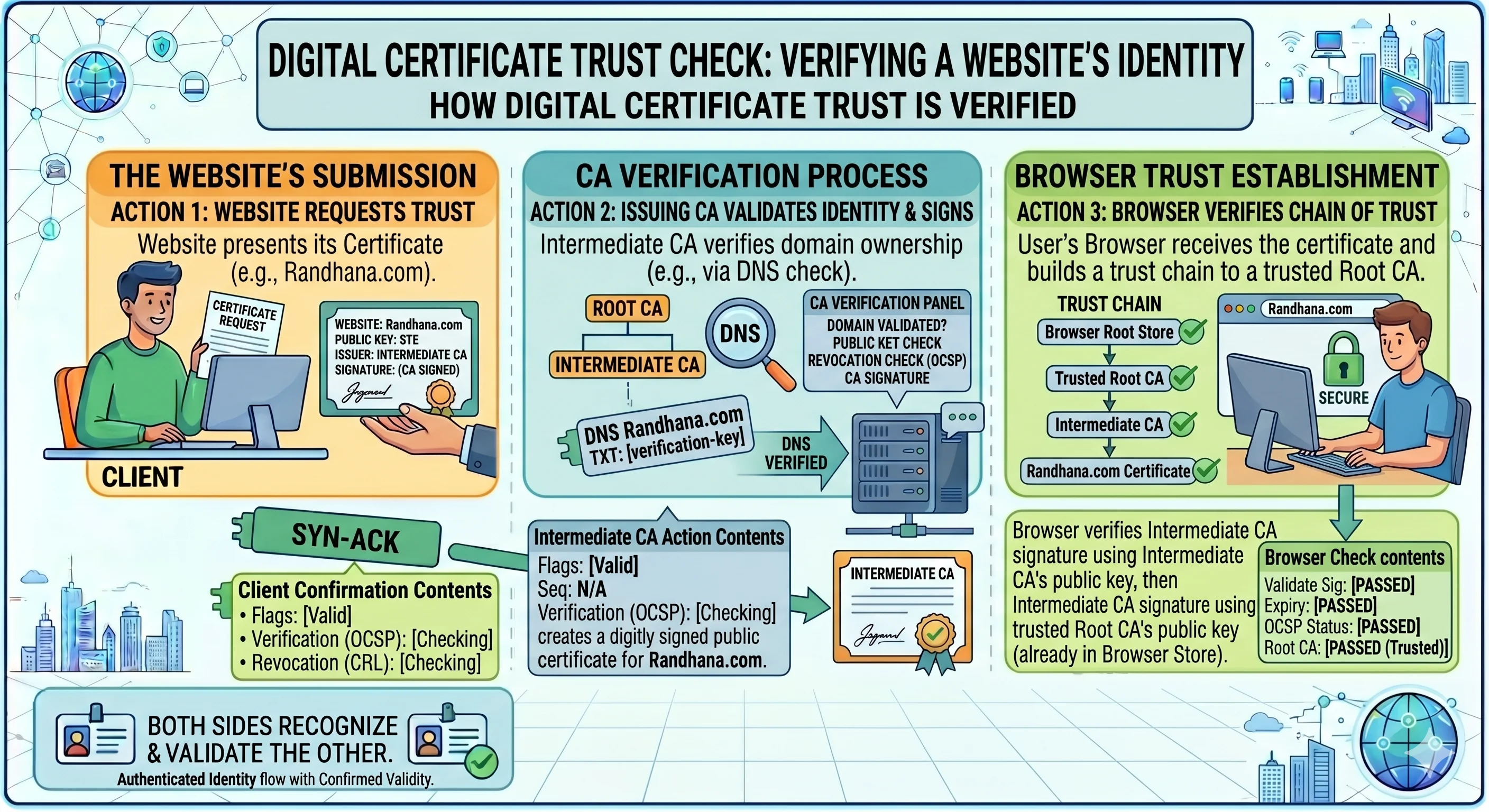
A certificate contains:
- Server's Public Key the actual encryption key
- Domain Name which domain this cert belongs to
- Validity Dates certificates expire
- CA's Digital Signature proof it was issued by a trusted authority
- Certificate Chain links back to a root that your browser already trusts
Certificate Authorities (CA)
A CA is a trusted organization like Let's Encrypt, DigiCert, or Google Trust Services that:
- Verifies the domain owner is who they claim to be
- Signs the certificate with their own private key
- Has their root certificate pre-installed in your OS and browser
The trust works like this:
- Your browser has the CA's public key already installed
- Server sends a certificate signed with the CA's private key
- Your browser uses the CA's public key to verify that signature
- Valid signature → certificate is genuine → server is who it claims to be
Certificate Chain How Trust Flows
Certificates don't always link directly to a root CA. Often there's a chain of intermediate CAs. Here's a real-world example:
GlobalSign Root CA  ← pre-installed in your browser/OS (the trust anchor)
        ↓ signed
GTS Root R4
        ↓ signed
WE1  (Google Trust Services)
        ↓ signed
randhana.com's Certificate
The root CA at the top is what your browser already trusts. Everything below it is verified by walking up the chain. If the whole chain is valid, the server is trusted.
You'll often hear "SSL certificate" but the correct modern term is TLS certificate. SSL is deprecated. People still say SSL out of habit, it's technically wrong.
Part 5: How Browsers Actually Verify a Certificate
When the browser receives a certificate, it doesn't just read who signed it and take their word for it. It actively verifies the entire chain. Here's the step-by-step of what actually happens:
Step 1 Server sends the chain
Server sends: randhana.com cert → WE1 cert → GTS Root R4 cert
Step 2 Browser checks randhana.com's cert
- Is it expired? → No ✓
- Does the domain match what I'm connecting to? → Yes ✓
- Who signed it? → "Google Trust Services WE1" → verify signature using WE1's public key (from the next cert in chain)
Step 3 Browser checks WE1's cert
- Is it expired? → No ✓
- Who signed it? → "GTS Root R4" → verify signature using GTS Root R4's public key
Step 4 Browser checks GTS Root R4
- Is it self-signed? (issuer = subject, meaning it's a root) → Yes ✓
- Is this root in my pre-installed trust store? → Found ✓
- Does the self-signature verify? → Yes ✓
Result: Chain is TRUSTED ✓
One question that came up when I learned this: does the browser call the internet to verify? No. All root certificates are pre-installed on your device. The OS maintains and updates them. The browser may optionally check a revocation list (CRL or OCSP) to catch certs that were revoked early but the core chain verification is entirely local, no internet needed.
Part 6: The TLS Handshake Step by Step
Now all the building blocks are in place. TCP gives us a reliable connection. Cryptography gives us the tools. Certificates give us identity verification. The TLS handshake is where everything comes together.
This happens immediately after the TCP three-way handshake completes.
Steps
1. Client Hello
Client kicks things off:
TLS Version: 1.3
Supported Cipher Suites: TLS_AES_256_GCM_SHA384, etc.
Client Random: x7k#2q9p...  (random number, used later in key derivation)
2. Server Hello
Server picks the cipher suite both sides support:
TLS Version: 1.3 (agreed)
Cipher Suite: TLS_AES_256_GCM_SHA384
Server Random: m3y#9j5k...  (server's own random number)
3. Server Certificate
Server sends its certificate the signed document proving its identity. The client walks the chain exactly as described in Part 5.
4. Key Exchange Diffie-Hellman
This is the clever part. Both sides need to arrive at the same session key, but they can't just send it over the network that would defeat everything. Diffie-Hellman lets them each calculate the same key independently, from information that's safe to send publicly.
The paint color analogy makes this click:
Both sides know the same Public Base Color (not a secret, sent openly)

Client has:  Secret Color A  (never leaves client)
Server has:  Secret Color B  (never leaves server)

Step 1  Each mixes their secret into the public color and sends the result:
  Client sends: Mix(PublicColor + SecretA) → ClientMix   (attacker can see this)
  Server sends: Mix(PublicColor + SecretB) → ServerMix   (attacker can see this)

Step 2  Each takes what they RECEIVED from the other side, and mixes in their own secret:
  Client computes: Mix(ServerMix + SecretA) → SessionKey
  Server computes: Mix(ClientMix + SecretB) → SessionKey

Both arrive at the same SessionKey  without ever sending it.

Why the attacker can't crack it:
  Attacker sees: PublicColor, ClientMix, ServerMix
  Can't "un-mix" colors to recover SecretA or SecretB
  The math is one-way  easy to mix, impossible to reverse
Want to see the actual math behind this?
Diffie-Hellman Explained: How Two People Share Secrets Over Public Channels
✓ Both sides now have the same session key and neither of them sent it.
5. Handshake Verification
Both sides send a hash of the entire handshake conversation, encrypted with the new session key:
Client sends: Hash(all_handshake_messages) encrypted with SessionKey
Server sends: Hash(all_handshake_messages) encrypted with SessionKey

Hashes match → nothing was tampered with ✓
6. Encrypted Channel Open ✓
From this point on, every byte is encrypted with the session key:
Plaintext → AES_Encrypt(SessionKey) → Ciphertext → sent on wire
Ciphertext → AES_Decrypt(SessionKey) → Plaintext → received
Safe from eavesdropping, tampering, and impersonation.
Part 7: TLS 1.2 vs TLS 1.3 What Actually Changed
TLS 1.3 is a significant improvement over TLS 1.2. The biggest differences are speed and how the session key is established.
| Feature | TLS 1.2 | TLS 1.3 |
|---|---|---|
| Release Year | 2008 | 2018 |
| Handshake Roundtrips | 2 roundtrips | 1 roundtrip |
| Key Exchange | Browser generates key, encrypts it, sends it | Both sides calculate the same key (Diffie-Hellman) |
| Forward Secrecy | ⚠️ Only if ECDHE is configured (optional) | ✓ Always DH is mandatory in 1.3 |
| 0-RTT Reconnection | No | Yes (faster reconnects for known servers) |
| Performance | ~100ms handshake | ~30-50ms handshake |
TLS 1.2 Browser Creates and Sends the Key
Time 0ms:   ClientHello → "I support these ciphers"

Time 10ms:  ServerHello + Certificate
            → "Use AES-256, here's my cert and public key"

Time 20ms:  Browser generates AES key → encrypts with server's public key → sends it
            ← the session key just traveled the network (encrypted, but still transmitted)

Time 30ms:  Server uses private key to decrypt → gets the session key

Problem: the browser unilaterally decided the key
         the key (even encrypted) traveled the network  extra round trip, extra risk
TLS 1.3 Both Sides Calculate the Key
Time 0ms:   ClientHello + Client's DH parameters
            → "I support these ciphers, here's my math input"

Time 10ms:  ServerHello + Server's DH parameters + Finished
            → "Using AES-256, here's my math input  I already computed the session key"

Time 20ms:  Browser computes session key from server's DH params
            → Sends Finished → connection open

The session key was never transmitted  only the DH math inputs were
Both sides contributed to it (bilateral)
Visual Comparison
TLS 1.2:
  ClientHello →
              ← ServerHello + Cert
  Key Exchange (browser sends encrypted key) →
              ← Finished
  Finished →
  [ ready  ~100ms ]

TLS 1.3:
  ClientHello + DH params →
                           ← ServerHello + DH params + Finished
  Finished →
  [ ready  ~30-50ms ]
One fewer roundtrip, no key transmitted, forward secrecy always on. TLS 1.3 is strictly better.
Part 8: Session Key What Happens After the Handshake
Once the handshake is done and both sides have the session key, the asymmetric encryption is set aside completely. Everything from here uses symmetric AES.
Why Switch to Symmetric?
Asymmetric solved the key distribution problem but using it for every packet would be way too slow:
| Asymmetric (RSA) | Symmetric (AES) | |
|---|---|---|
| Speed | Slow complex math | Fast simple bit ops |
| Role in TLS | Used once: establish the session key | Used continuously: encrypt all data |
| Key size | 2048-4096 bits | 256 bits |
After the Handshake, It Looks Like This
Client: "SELECT * FROM users" → AES_Encrypt(SessionKey) → "x7k#2q9p#@!$" → sent
Server: "x7k#2q9p#@!$"       → AES_Decrypt(SessionKey) → "SELECT * FROM users" → executed
Session Key Properties Worth Knowing
- Unique per connection new key derived for every TLS session, no reuse
- Temporary deleted when the connection closes
- Never transmitted both sides derived it independently via DH math
- No need to go back to asymmetric once the session is established, the session key handles everything
Part 9: Forward Secrecy Can Someone Decrypt Old Traffic?
This question came up naturally while learning this: if someone captures all my HTTPS traffic today, and somehow gets hold of the server's private key later can they decrypt it?
The answer depends on how the session key was established.
Case 1 TLS 1.2 Without ECDHE (Decryptable)
In this setup, the browser generated the session key and sent it (encrypted with the server's public key). An attacker who later obtains the server's private key can:
- Decrypt the key exchange message to get the session key
- Use that to decrypt every packet in that session ✗
This is the core weakness of TLS 1.2 when ECDHE isn't used.
Case 2 TLS 1.2 / TLS 1.3 With ECDHE (Forward Secrecy)
The session key was derived from temporary Diffie-Hellman parameters generated just for that one handshake and discarded immediately after. Even with the server's private key in hand, there's nothing to decrypt the session key from. Those ephemeral secrets are gone forever.
This is forward secrecy: compromising the server's private key in the future doesn't expose any past sessions.
How to Check What Your Server Is Using
openssl s_client -connect yoursite.com:443
Look for this line in the output:
Server Temp Key: X25519, 253 bits
X25519 means ECDHE is in use forward secrecy is active. For TLS 1.2, look for ECDHE-RSA or ECDHE-ECDSA. If you see plain RSA without ECDHE no forward secrecy.
| Configuration | Security | Why |
|---|---|---|
| TLS 1.3 + X25519/ECDHE | 🟢 Excellent | Modern, forward secrecy always on |
| TLS 1.2 + ECDHE | 🟡 Good | Forward secure, older handshake |
| TLS 1.2 + RSA (no ECDHE) | 🟠 Weak | No forward secrecy |
| SSL 3.0 or TLS 1.0 | 🔴 Broken | Known attacks, don't use |
Part 10: Keep-Alive Reusing the Connection
Setting up a TLS connection costs time: TCP handshake, then TLS handshake. That's real latency. Once a connection is open, you want to keep it alive and reuse it rather than paying that cost on every request.
Without Keep-Alive (Old HTTP/1.0)
Request 1: TCP open → TLS handshake → send → receive → connection CLOSED
Request 2: TCP open → TLS handshake → send → receive → connection CLOSED
Request 3: TCP open → TLS handshake → send → receive → connection CLOSED

3 requests × ~100ms handshake = 300ms wasted on setup alone
With Keep-Alive (HTTP/1.1+)
Request 1: TCP open → TLS handshake → send → receive → connection STAYS OPEN
Request 2: reuse connection → send → receive  (no handshake!)
Request 3: reuse connection → send → receive  (no handshake!)

Request 4 (35s later, after idle timeout): TCP open → TLS handshake → ...

Total for requests 1-3: ~120ms. Saved 180ms just by reusing the connection.
How the Keep-Alive Settings Work
The server controls this client can't override it.
Server response header:
Connection: keep-alive
Keep-Alive: timeout=30, max=100

timeout=30 → close connection after 30 seconds of no requests
max=100    → close after 100 requests, even if still active
In practice:
Request 1   → opens TCP + TLS          (count: 1/100)
Request 2   → reuses connection        (count: 2/100)
...
Request 100 → reuses connection        (count: 100/100  MAX REACHED)
              server closes connection

Request 101 → new TCP + TLS needed    (count: 1/100 again)

OR: if idle for 30+ seconds before hitting 100 → server closes → next request needs new connection
Configuring Keep-Alive on Your Server
Nginx
http {
    keepalive_timeout 30;
    keepalive_requests 100;
}
Apache
KeepAliveTimeout 30
MaxKeepAliveRequests 100
When Does a Connection Close?
1. Idle timeout expires  no requests for N seconds
2. Max request count reached
3. Client sends Connection: close header
4. Network error
5. Server restarts
Part 11: TCP vs UDP Why HTTPS Doesn't Use UDP
Everything covered so far uses TCP. But there's another protocol UDP and understanding why HTTPS doesn't use it makes clear what TCP is actually providing.
What is UDP?
UDP (User Datagram Protocol) is connectionless. No handshake. No acknowledgment. No guarantees. You fire a packet into the network and it either arrives or it doesn't.
TCP (like registered mail):
  Send → tracked → confirmed delivered → retried if lost

UDP (like dropping a note out a window):
  Send → it goes somewhere → might arrive, might not
TCP vs UDP
| TCP | UDP | |
|---|---|---|
| Connection | Requires handshake | No connection |
| Reliability | Guaranteed delivery | Best effort |
| Order | Packets arrive in order | No guarantee |
| Speed | Slower (overhead) | Faster |
| Lost packets | Auto-retried | Gone forever |
| Keep-Alive | Needed | Not applicable |
| Use case | HTTPS, email, databases | Video, games, DNS, VoIP |
When Each Makes Sense
TCP when losing data is not okay:
- HTTPS one missing byte can break a page
- Email every message must arrive
- Database queries data corruption is unacceptable
- Banking every transaction must be confirmed
UDP when real-time matters more than perfect delivery:
- Live video a dropped frame is better than freezing
- Online games position updates are continuous, old data is worthless anyway
- DNS a failed lookup just retries immediately
- VoIP a brief silence is better than an awkward delay from retransmitting
Why HTTPS Has to Use TCP
- Completeness a web page must arrive in full. One missing byte in HTML, CSS, or JS breaks things.
- Order scrambled HTML is garbage.
- State sessions, cookies, login state need a persistent connection to track.
- Large data UDP has packet size limits (~64KB). TCP handles megabytes transparently.
UDP would break all of this. TCP is the only sensible choice for HTTPS.
Part 12: Putting It All Together MySQL Over TLS
Let's make everything concrete with a real scenario: an application connecting to a MySQL database over TLS.
mysql --host=db.example.com --user=root --password \
      --ssl-ca=ca-cert.pem \
      --ssl-cert=client-cert.pem \
      --ssl-key=client-key.pem
What Happens Under the Hood
Step 1 TCP Handshake (Layer 4) App and MySQL exchange SYN/SYN-ACK/ACK. TCP connection established.
Step 2 TLS Handshake (Layer 5)
- MySQL sends its certificate
- App verifies the cert chain against ca-cert.pem
- Both derive a session key via Diffie-Hellman
- Encrypted channel open
Step 3 MySQL Protocol (Layer 7) All queries and results flow encrypted:
App   → "SELECT * FROM users;"        (encrypted with SessionKey)
MySQL → [{id:1, name:...}, ...]       (encrypted with SessionKey)
Step 4 Connection Closes Session key is discarded. Connection terminated.
The Certificate Files and What They Do
| File | What It Contains | Who Uses It | Public or Secret? |
|---|---|---|---|
ca-cert.pem | The CA's certificate | Client (to verify server) | Public |
server-cert.pem | Server's public certificate | Server (sends to client) | Public |
server-key.pem | Server's private key | Server only | 🔒 Secret |
client-cert.pem | Client's cert (mutual TLS) | Server (verifies client) | Public |
client-key.pem | Client's private key (mutual TLS) | Client only | 🔒 Secret |
Part 13: Reading a Live TLS Connection OpenSSL
One of the most useful things to know is how to inspect what's actually happening in a TLS connection. The openssl CLI gives you everything:
openssl s_client -connect randhana.com:443 -servername randhana.com
This runs a full TLS handshake against the server and dumps all the details. Here's how to read it.
Certificate Details
| Field | Meaning | Example |
|---|---|---|
s: (Subject) | Who the certificate is for | randhana.com |
i: (Issuer) | Who signed it | Google Trust Services (WE1) |
| Public Key Type | Algorithm for asymmetric encryption | ECDSA, 256-bit |
| NotBefore/After | Validity window | Mar 4 2026 → Jun 2 2026 |
Full Output Breakdown
| Output Line | What It Means |
|---|---|
depth=2 ... GTS Root R4 | Root CA 2 hops from the server cert |
depth=1 ... WE1 | Intermediate CA 1 hop from server cert |
depth=0 ... randhana.com | The server's own certificate |
verify return:1 | Each cert in the chain verified successfully ✓ |
PKEY: id-ecPublicKey, 256 | Server's public key: ECDSA, 256-bit |
sigalg: ecdsa-with-SHA256 | Cert signed with ECDSA + SHA256 |
NotBefore: Mar 4, NotAfter: Jun 2 | 3-month validity window |
TLSv1.3 | TLS 1.3 negotiated ✓ |
Cipher: TLS_AES_256_GCM_SHA384 | Symmetric cipher for data encryption |
Server Temp Key: X25519, 253 bits | ECDHE in use forward secrecy enabled ✓ |
Decoding the Cipher Suite
TLS_AES_256_GCM_SHA384
├─ TLS      = the protocol
├─ AES_256  = 256-bit AES symmetric encryption for data
├─ GCM      = Galois/Counter Mode  handles both encryption and integrity in one pass
└─ SHA384   = hash function for the integrity check (HMAC)
What the Key Exchange Line Tells You
New, TLSv1.3, Cipher is TLS_AES_256_GCM_SHA384
Server Temp Key: X25519, 253 bits

→ TLS 1.3 is negotiated ✓
→ X25519 = ECDHE (ephemeral Diffie-Hellman) = forward secrecy on ✓
→ AES-256-GCM for all data ✓
→ SHA384 for integrity ✓
For TLS 1.2, look for ECDHE-RSA or ECDHE-ECDSA in the Temp Key line forward secrecy is on. If you see plain RSA with no ECDHE prefix it's not.
Part 14: Summary
The Full Lifecycle of One Secure Connection
1. TCP Handshake     → Reliable channel established (SYN / SYN-ACK / ACK)
2. TLS Handshake     → Identity verified + session key derived via Diffie-Hellman
3. Data Transfer     → Everything encrypted with AES session key
4. Connection Closes → Session key discarded, gone forever
Key Concepts at a Glance
| Concept | What It Does | How |
|---|---|---|
| TCP | Reliable, ordered transport channel | Three-way handshake |
| TLS Handshake | Verify identity + establish encryption | Certificates + Diffie-Hellman |
| Certificate | Binds a public key to a domain name | Signed by a trusted CA |
| Private Key | Signs certs, used in key exchange | Never leaves the server |
| Session Key | Encrypts all application data | Derived independently via DH |
| ECDHE | Ensures past sessions stay private | Ephemeral DH key discarded after use |
| Keep-Alive | Reuses connections to avoid repeated handshakes | Server-configured timeout |
Thanks for reading 👋